
How to Deposit and Withdraw on Kalshi: Methods, Fees and Holds
Every Kalshi deposit and withdrawal method with its fee, timing and hold, taken from Kalshi's own help pages, plus why your balance and your withdrawable cash can differ.

Kalshi · Trade $25 and Get $25!
WINPREDICTSClaim21+ · T&Cs apply
Certain limitations apply. The offer is available to new users only, subject to the terms and conditions at kalshi.com/tc/500. 18+ only. Restrictions and eligibility requirements apply. Event contract trading involves significant risk and is not appropriate for everyone. Please carefully consider if it is appropriate for you in light of your personal financial circumstances. Kalshi products are not available in all jurisdictions. See kalshi.com/regulatory for more information.

The short answer
Kalshi's minimum deposit is $10, or $1,000 by wire. Bank transfers and wires carry no Kalshi fee, while a debit card deposit may cost 2%. Kalshi lists no fee for withdrawals to a bank account, debit card, PayPal, Venmo or crypto wallet, though its payment processor may charge on crypto. Card and bank deposits can be held up to 2 days after settling, and debit card withdrawals have a daily limit.
Kalshi · Trade $25 and Get $25!
WINPREDICTS
Certain limitations apply. The offer is available to new users only, subject to the terms and conditions at kalshi.com/tc/500. 18+ only. Restrictions and eligibility requirements apply. Event contract trading involves significant risk and is not appropriate for everyone. Please carefully consider if it is appropriate for you in light of your personal financial circumstances. Kalshi products are not available in all jurisdictions. See kalshi.com/regulatory for more information.
Last checked October 14, 2026
Where things stand
- Minimum deposit: $10 for bank, card, PayPal and Venmo. Wires under $1,000 are returned.
- Free ways in: bank transfer (ACH), wire and real-time payment (RTP). Your own bank may charge for an RTP.
- Ways in that can cost money: debit card (may carry a 2% processing fee), PayPal and Venmo after the first deposit, Cash App, and crypto (provider and network fees).
- Withdrawal fees: no Kalshi fee on bank, debit card, PayPal, Venmo or crypto withdrawals. Kalshi's fee schedule says its payment processor may charge a fee on crypto, shown before you confirm.
- Holds: up to 2 days after settlement on card and bank deposits when you withdraw to a different method. No hold on PayPal, Venmo, Cash App, crypto or wire deposits.
- Welcome offer: Trade $25 and Get $25! with code
WINPREDICTS, valid in 47 states + D.C.
Last checked: October 13, 2026
Every figure on this page comes from Kalshi's own Help Center deposit and withdrawal pages. Your account can show different limits, so the transfer screen is the final word for your own transaction. For how the platform scores overall, see our Kalshi review.
How do you deposit on Kalshi?
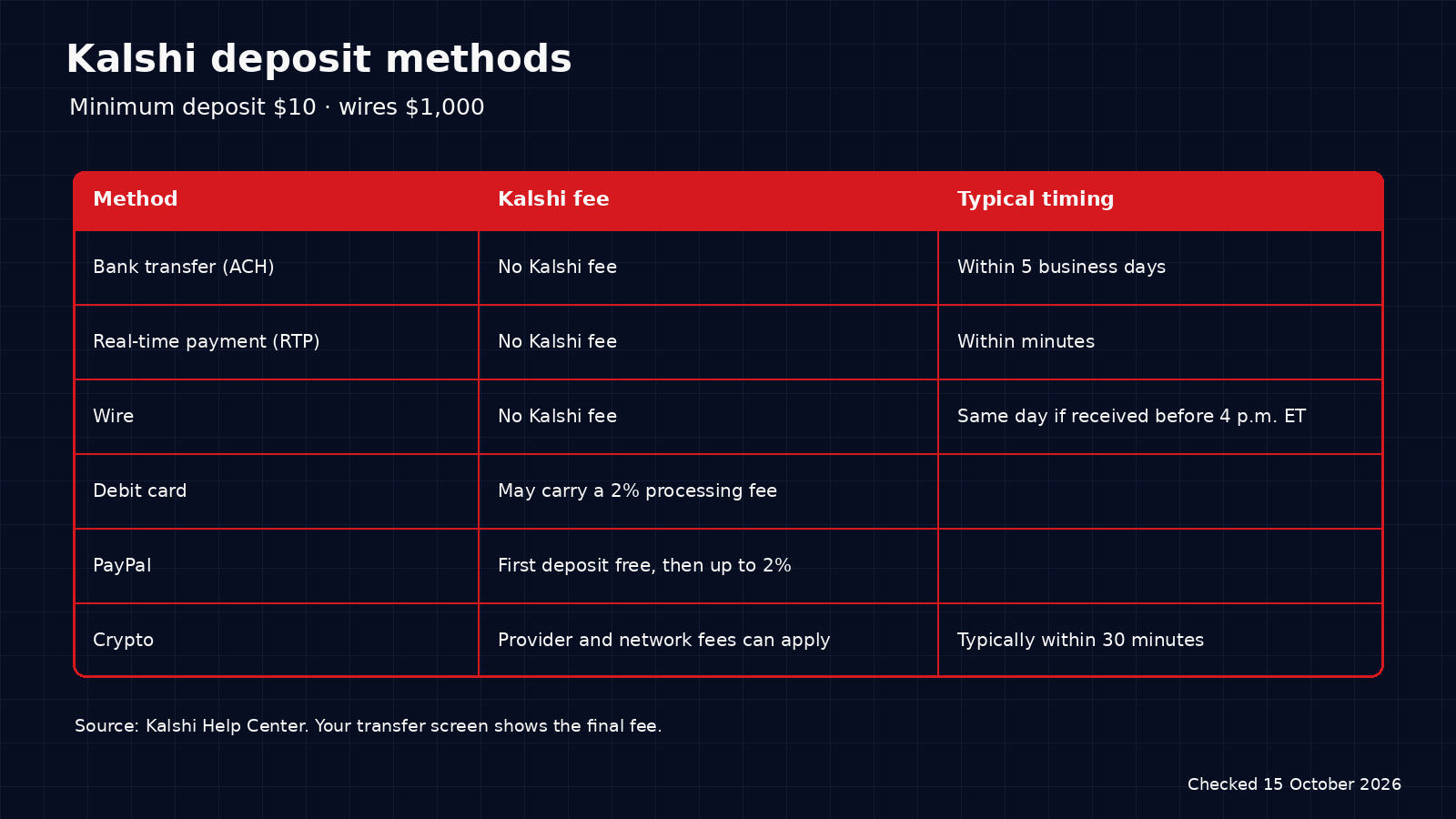
Open the Transfers tab on the website or in the app, choose a method, enter at least $10 and confirm. Kalshi says a deposit cannot be canceled or refunded once it is submitted, so check the amount first. The account you pay from must be in your own name.
| Method | Kalshi's fee | What to know |
|---|---|---|
| Bank transfer (ACH) | None | US users only. Typically settles within 5 business days. Kalshi often credits part of the deposit right away |
| Wire | None | $1,000 minimum. A wire received before 4 p.m. ET is typically credited the same day. It must carry your personal memo code |
| Real-time payment (RTP) | None from Kalshi. Your bank may charge | Arrives within minutes from a US bank on the RTP network |
| Debit card, Apple Pay, Google Pay | May carry a 2% processing fee | Visa, Mastercard and Discover debit cards. American Express is not supported |
| PayPal | First deposit free. Later ones may cost up to 2% | US users only, and not offered in every state |
| Venmo | First deposit free. Later fees may vary (no amount stated) | US users only, and not offered in every state |
| Cash App | Subject to a fee (no amount stated) | Deposits only, US users only. You cannot withdraw to Cash App |
| Crypto | Provider and network fees can apply | Typically credited within 30 minutes. The limit is shown on the deposit screen |
One warning from Kalshi's bank deposit page: if a transfer fails or is returned after part of it was credited early, the credited amount is taken back, and your balance can go negative if you already traded with it. Make sure the bank account holds the full amount before you start.
New to Kalshi? Open a Kalshi account with code WINPREDICTS before your first trades so they count toward Trade $25 and Get $25! Kalshi's minimum age is 18; we recommend 21+.
Certain limitations apply. The offer is available to new users only, subject to the terms and conditions at kalshi.com/tc/500. 18+ only. Restrictions and eligibility requirements apply. Event contract trading involves significant risk and is not appropriate for everyone. Please carefully consider if it is appropriate for you in light of your personal financial circumstances. Kalshi products are not available in all jurisdictions. See kalshi.com/regulatory for more information.
How do you withdraw from Kalshi?
Open the Transfers tab, choose "Withdraw from Kalshi", pick where the money should go, enter the amount and confirm. Kalshi's help pages list no fee for bank, debit card, PayPal, Venmo or crypto withdrawals. They state no fee, either way, for a wire withdrawal.
| Method | Kalshi's fee | Stated timing | What to know |
|---|---|---|---|
| Bank transfer | None | Within a few business days | US users only |
| Debit card | None | Typically a few hours | A daily limit applies, personal to your account |
| PayPal | None | Not stated | Link the account on the deposit page first. No deposit is needed to link it |
| Venmo | None | Not stated | Same linking step as PayPal |
| Crypto | None from Kalshi. Its payment processor may charge a fee on crypto, shown before you confirm | Typically within 30 minutes | Needs a prior crypto deposit. Document verification may be required |
| Wire | No fee stated by Kalshi | Not stated | Kalshi describes wires as suitable for amounts greater than $500,000 |
If a payout cannot be delivered, Kalshi says the money returns to your Kalshi balance and you can withdraw again to an active method. The rules differ by platform: here is how Polymarket US withdrawals compare.
Why can't you withdraw your whole Kalshi balance?
Three rules explain most cases.
- A hold on card and bank deposits. Money deposited by debit card, Apple Pay, Google Pay or bank transfer can go back to the same method once the deposit settles, and to a different method up to 2 days after it settles. PayPal, Venmo, Cash App, crypto and wire deposits have no hold.
- A daily limit on debit card withdrawals. Kalshi says this limit is personalized to your account and increases with account activity. Kalshi's help pages state a daily limit only for debit card withdrawals and give none for the other methods, so check the transfer screen before a large withdrawal.
- Open positions. Money in an open position cannot be withdrawn until you close the position or the market settles.
The hold covers only the amount you deposited. Settled winnings above that amount can be withdrawn straight away. The withdrawal screen shows when each deposit becomes available.
How long do Kalshi deposits and withdrawals take?
Fastest in: RTP (minutes), crypto (typically up to 30 minutes) and a wire, typically the same day if it arrives before 4 p.m. ET. Slowest in: a bank transfer, which typically settles within 5 business days. Weekends and bank holidays do not count.
Fastest out: crypto (typically 30 minutes) and debit card (typically a few hours). A bank withdrawal arrives within a few business days. A card payout can also pause for a payment-processor review, which Kalshi says takes 3 to 5 business days.
Are trading fees separate from deposit fees?
Yes. Moving money and trading are charged separately. Kalshi's Fees page says it charges a transaction fee on the expected earnings of a contract when a trade is executed. Some markets also carry a maker fee on resting orders, charged only if the order fills. Canceling a resting order is free. Kalshi shows the fee behind the "i" icon on the order ticket, and our P&L calculator helps you see what a trade returns.
Where can you use Kalshi?
Kalshi's welcome offer on PredictionWins is valid in 47 states + D.C. Sports contracts are a separate question. As of October 13, 2026, court orders block Kalshi's sports contracts in Nevada, Michigan and Washington, and Washington's order also covers several non-sports categories. In Massachusetts the status is "Available — dispute pending": a judge ordered the same in January 2026, but that order is paused while the state's highest court decides Kalshi's appeal. Check the app before you deposit.
Only deposit money you can afford to lose. Comparing platforms first? Read Polymarket vs Kalshi, or see how deposits work on Polymarket US.
Sources
- Kalshi Help Center: Transfers FAQ, Bank Deposits, Card Deposits, PayPal Deposits, Venmo Deposits, Cash App Deposits, Crypto Deposits, How to Deposit Funds via Wire Transfer, How to Deposit Funds via Real-Time Payments (RTP) (checked October 13, 2026)
- Kalshi Help Center: Bank Withdrawals, Debit Card Withdrawals, PayPal Withdrawals, How do I withdraw funds using Venmo?, Crypto Withdrawals, Security Holds (checked October 13, 2026)
- Kalshi Help Center: Fees, and the Kalshi Fee Schedule (July 7, 2026 update) (checked October 13, 2026)
- Washington State Office of the Attorney General, Judge orders Kalshi to cease numerous Washington operations (checked October 13, 2026)
- Spectrum News, Michigan judge blocks Kalshi (checked October 13, 2026)
- CBS Sports, Prediction market legal states (checked October 13, 2026)
Frequently asked questions
What is Kalshi's minimum deposit?
Kalshi's minimum deposit is $10 by bank transfer, debit card, PayPal or Venmo. Wire transfers need at least $1,000, and Kalshi returns smaller wires to the sending bank.
Does Kalshi charge a fee to deposit?
Bank transfers (ACH) and wires carry no Kalshi fee. A debit card deposit, including Apple Pay and Google Pay, may carry a 2% processing fee. The first PayPal deposit is free and later ones may cost up to 2%. The first Venmo deposit is free and later ones may carry a fee. Cash App deposits carry a fee. Kalshi states no amount for Venmo or Cash App.
Does Kalshi charge a fee to withdraw?
Kalshi's help pages list no fee for withdrawals to a bank account, debit card, PayPal, Venmo or crypto wallet. On crypto, Kalshi's fee schedule says its payment processor may charge a fee, which is shown before you confirm. Kalshi states no fee, either way, for a wire withdrawal.
How long does a Kalshi withdrawal take?
Kalshi says bank withdrawals typically arrive within a few business days, debit card withdrawals typically within a few hours and crypto withdrawals typically within 30 minutes. It gives no timing for PayPal or Venmo.
Why can't I withdraw all my money from Kalshi?
Money deposited by debit card or bank transfer can be held for up to 2 days after the deposit settles when you withdraw to a different method. Debit card withdrawals also have a daily limit that is personal to your account, and money in open positions cannot be withdrawn until you close them.
Can I withdraw from Kalshi to Cash App?
No. Kalshi accepts Cash App for deposits only. Money deposited with Cash App can be withdrawn by bank transfer or debit card, or by crypto if you have made a crypto deposit before.
21+ · T&Cs apply · Terms
Certain limitations apply. The offer is available to new users only, subject to the terms and conditions at kalshi.com/tc/500. 18+ only. Restrictions and eligibility requirements apply. Event contract trading involves significant risk and is not appropriate for everyone. Please carefully consider if it is appropriate for you in light of your personal financial circumstances. Kalshi products are not available in all jurisdictions. See kalshi.com/regulatory for more information.


